
Ms teams room monitoring - AVM 360
MS Teams Room Monitoring

Teams Pro Portal sees
the compute.
AVM-360 sees the whole room.

The Microsoft Teams Rooms Pro Management Portal is excellent at what it does — managing certified MTR hardware. But it was never designed to monitor the DSPs, displays, cameras, processors and AV signal chain that make up the rest of your meeting room. That's where AVM-360 starts.

40%
Fewer truck rolls
60%
Technician efficiency gain
100%
Of the room — not just the MTR
Understanding the gap

Two tools. Different scopes. Both matter.

Teams Pro Portal and AVM-360 are not competitors. They see different parts of the same room.

Teams Pro Management Portal Microsoft

  • MTR compute online / offline status
  • Teams app version and health
  • Certified USB peripheral status (Connected / Disconnected)
  • Call quality — audio, video, network MOS scores
  • Automated firmware updates for certified devices
  • Incident management and auto-remediation
  • Meeting usage analytics

Designed to manage certified MTR hardware and its directly-connected peripherals. Excellent for what it does — but the scope is the MTR stack, not the full room.

AVM-360 Complementary layer

  • Everything Teams Pro Portal covers, plus —
  • DSPs and audio processors (QSC, Biamp, Shure)
  • Displays not on the network (via HDMI-CEC)
  • Networked display telemetry (temp, firmware, usage hours)
  • Projector lamp hours and overheat alerts
  • PTZ cameras beyond basic USB detection
  • Network switches — per-port PoE and error status
  • Devices connected through AV processors
  • Multi-platform rooms — Teams, Zoom, or mixed

AVM-360 sees the whole room — every device in the AV signal chain, not just the compute.

Detailed comparison

What gets monitored — and what doesn't.

Scroll through the full picture. Green means monitored. Red means not.

Monitoring Capability Teams Pro Portal AVM-360
MTR Compute & Software
MTR compute online / offlineWindows or Android compute module
Teams Rooms app version & healthApp crash detection, update state
Firmware & OS update managementAutomated push to certified devicesAVM-360 tracks versions, Teams pushes
Call quality — MOS scores, jitter, packet lossPer-meeting audio/video quality data via Teams Pro Portal integration
Certified USB Peripherals
USB camera — connected or disconnectedCertified Teams camera
USB microphone/speakerbar statusCertified Teams audio peripherals
USB peripheral firmware updatesPush updates to certified devicesVersion tracked, updates via Teams
Displays & Screens
Display signal detected (HDMI present/absent)Does the MTR compute see a display?
Display power state (on / standby)Is the display actually switched on? via CEC or Samsung MDC / LG API
Display input sourceIs it on the correct HDMI input?
Panel temperature & error flagsOverheating warnings before failure networked displays
Display usage hours & firmwareAsset lifecycle visibility networked displays
Non-networked display controlDisplay connected via HDMI only — no IP HDMI-CEC power on/off & input control
Audio Processing & Microphones
DSP health — QSC Core, Biamp TesiraAudio processor temp, fan, signal status
Ceiling / table mic status through DSPSennheiser, Shure, Biamp ceiling mics
Audio routing & mute stateIs audio flowing correctly through the room?
Cameras & Video
PTZ camera telemetry & stream healthAver, Poly, Cisco PTZ cameras
Camera firmware versionAsset and compliance tracking
Projectors
Projector lamp / light source hoursKnow before the lamp fails mid-meeting
Projector temperature & overheat alertsEpson, Panasonic, Sony laser projectors
Network & Infrastructure
MTR compute network qualityLatency, packet loss to Microsoft 365
Managed switch per-port PoE & errorsNetgear, Cisco, HP switches powering the room
Platform & Deployment
Teams-only estate managementMicrosoft ecosystem onlyTeams + Zoom + any mix
Cloud or on-premise deploymentData stays in your network if needed Cloud only Both
White-label portal for MSPs & integratorsYour brand, your clients
Ticketing integration — ServiceNow, Jira, ZendeskServiceNow only (Pro+) All three
Teams Pro Portal is authoritative for the MTR compute and certified peripherals. AVM-360 adds visibility to everything else in the room.
What's actually in a Teams Room

The MTR compute is one component of many.

A modern enterprise Teams Room has 8–12 distinct devices. Teams Pro Portal manages one of them deeply. AVM-360 sees all of them.

💻

MTR Compute

Windows or Android compute module running Teams Rooms

Teams + AVM-360
🎤

Certified USB Peripherals

Camera, mic, speakerbar directly USB-connected to MTR

Teams + AVM-360
🖥️

Display(s)

Usually HDMI-only. Power state, input, temp invisible to Teams

AVM-360 only
🎚️

DSP / Audio Processor

QSC Core, Biamp Tesira handling room audio routing

AVM-360 only
🎙️

Ceiling / Table Mics

Sennheiser, Shure, Biamp mics connected through a DSP

AVM-360 only
📹

PTZ Camera

Aver, Poly, Cisco PTZ — stream health, position, firmware

AVM-360 only
📽️

Projector

Lamp hours, temperature alerts, power state

AVM-360 only
🌐

Network Switch

PoE switch powering every device in the room

AVM-360 only
Monitored by Teams Pro Portal + AVM-360
Monitored by AVM-360 only
Displays not on the network

No IP address? AVM-360 still reaches it.

Most commercial displays in Teams Rooms connect via HDMI only — no IP, no network port, no visibility. AVM-360 uses HDMI-CEC to reach them anyway.

Power state monitoring

Know whether the display is actually on or in standby — not just whether the HDMI signal is present at the MTR.

🔌

Remote power control

Power the display on before a meeting starts, or off at end-of-day — without touching the display or the MTR compute.

📺

Input source control

Confirm or force the correct HDMI input — eliminating the "screen is on HDMI 2 instead of HDMI 1" helpdesk call.

🌿

Green scheduling

Automated power-off routines reduce idle energy consumption. No display needs to stay on overnight or between bookings.

Supported via CEC:

Samsung Anynet+ LG SimpLink Sony Bravia Sync Philips Commercial

For full telemetry (temperature, usage hours, firmware), connect the display to the network and AVM-360 uses Samsung MDC or LG LAN protocols to pull deeper data.

Flexible by design

Works however your organisation is set up.

Whether you're already on Teams Rooms Pro licensing, running basic Teams, or managing a mixed environment — AVM-360 fits in without requiring you to change anything.

Option A — With Teams Pro Portal

Complete room visibility

Teams Pro Portal manages the certified MTR stack. AVM-360 fills in everything else — displays, DSPs, cameras, projectors, switches. Together you see the full room, not just the compute.

  • Teams Pro Portal handles MTR and USB peripherals
  • AVM-360 monitors the wider AV chain
  • Single additional dashboard — no workflow change
  • Call quality data from Pro Portal integrated into AVM-360
Option B — Without Teams Pro Portal

Standalone AV monitoring

On standard Teams licensing and not using the Pro Management Portal? AVM-360 gives you complete AV estate visibility from day one — no additional Microsoft licensing required.

  • MTR compute health and uptime monitoring
  • Displays, cameras, DSPs, projectors — all covered
  • Cloud or on-premise — your infrastructure, your choice
  • Works for Teams, Zoom, or mixed room estates
Option C — MSPs & Integrators

Multi-client, white-label

Manage Teams Rooms across multiple client sites from a single white-labelled dashboard. Your brand, your clients — regardless of what Microsoft licensing each client holds.

  • Multi-tenant — all clients, one dashboard
  • White-label portal under your brand
  • Works across mixed Microsoft licensing tiers
  • Ticketing integration — ServiceNow, Jira, Zendesk
What AVM-360 actually sees

Real data. Every component.

Not just online/offline — actual telemetry from inside each device in the Teams Room.

💻

MTR Compute

  • Online / offline & uptime
  • Teams app version & crash status
  • Call quality (via Teams Pro Portal integration)
  • Firmware & OS version
🖥️

Displays

  • Power state (on / standby)
  • Input source — correct HDMI?
  • Panel temp & error flags (networked)
  • Usage hours & firmware (networked)
🎚️

DSP / Audio Processor

  • System & processor temperature
  • Fan speed & memory usage
  • Audio signal routing status
  • Online / offline, firmware version
🎙️

Microphones

  • Online status through DSP
  • Mute state
  • Firmware version
  • Beam / coverage position (Sennheiser)
📹

PTZ Camera

  • Online status & stream health
  • PTZ position
  • Firmware version
  • Connection to room system
📽️

Projector

  • Lamp / laser source hours
  • Temperature & overheat alert
  • Power state & input
  • Firmware version
Start monitoring today

See every device in every Teams Room.
Not just the compute.

30-day free trial. Full access. Our team handles the setup. No credit card required.

Set up in under 24 hours  ·  Works alongside Teams Pro Portal  ·  Cancel anytime

MTR Monitoring

Single Pane of Glass for Every Microsoft Teams Room. 

Monitor, manage, and troubleshoot your entire MTR estate- regardless of hardware vendor. Deep-dive telemetry meets device-agnostic control.

Device Agnostic

Unified AV Monitoring
Made Simple

AVM-360

Tired of Switching Between 5 Different Management Portals?

Stop Managing Hardware Silos Most MTR environments suffer from vendor fragmentation. Switching between proprietary portals for Poly, Crestron, or Logitech is inefficient. AVM-360 consolidates these silos into one actionable dashboard. AVM-360 bridges the gap. We provide a vendor-neutral platform that deep-dives into MTR data to give you total visibility across your global footprint.

Enterprise AV monitoring platform with real-time alerts - AVM 360
Reduction in
costly truck rolls
0 %
Increase in on-site
technician efficiency
0 %
Decrease in service
call spend
0 %

Device Agnostic

Monitor Everything. Whether it’s Crestron, Poly, Logitech, or Yealink, AVM-360 treats them all as first-class citizens.

Device Agnostic Deep MTR Integration

Beyond the Basics. We don't just see "Online/Offline." We pull deep logs for peripherals, call quality, and system health.

Proactive Resolution

Fix it Before They Call. Automated alerts for disconnected mics, camera failures, or "hidden" PC crashes.

Visualize
Health at Scale WORKS

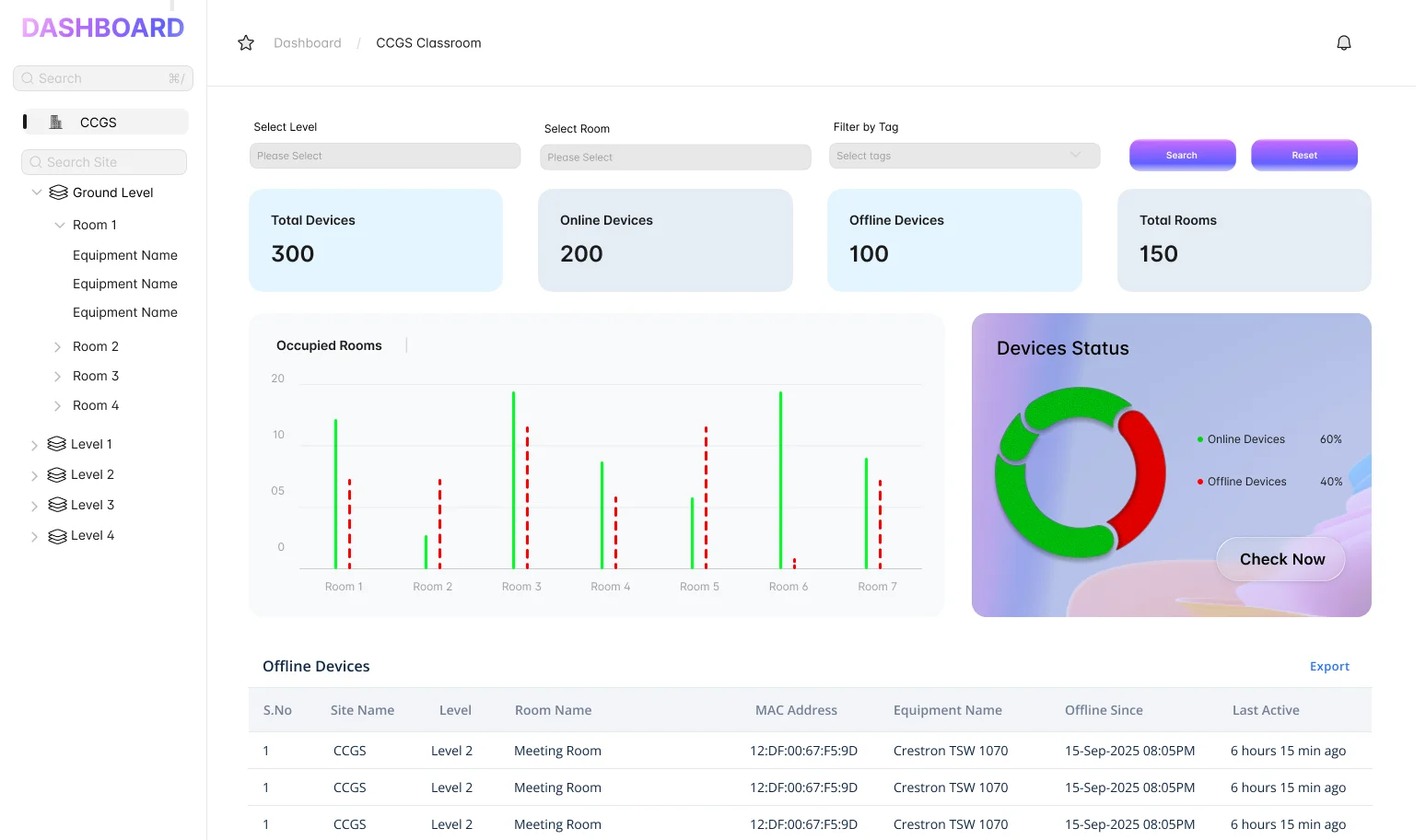
Our signature  Honeycomb Fault Grid  gives your help desk a real-time, color-coded map of every room.

1. Instant
Triage

See exactly which component is failing (Camera, Mic, or Console).

2.Hierarchical
View

Drill down from Global regions to specific floors and rooms in two clicks.

3. AI
Insights

Use Generative AI to analyze fault logs and get step-by-step troubleshooting steps immediately.

Native MTR Data Vendor-Neutral Control.

AVM-360 doesn’t just skim the surface. We integrate directly with the Microsoft Teams ecosystem to pull critical information

Peripheral Status

Real-time health of USB-connected cameras, speakers, and HID devices.

Log Forensics

Access device-specific logs for rapid post-incident analysis without needing an on-site technician.

Remote Remediation

Execute remote reboots, firmware updates, and configuration changes from a single dashboard.

Customers Testimonial

Modern Workplace Manager Enterprise Business

AVM-360 transformed how we manage our 800+ Teams Rooms globally. We reduced field visits by 40% because we finally had the data to fix issues remotely."

Technical Lead Global Managed Services

"AVM360 gave us the actual solution we needed, allowing us to monitor the Teams engine, mics, soundbar and cameras in one view. Our support team is now twice as fast at resolving issues."

Executive Director Global It Services

"With AVM360, we’ve transitioned 30% of our clients to a 'Managed AV' tier, creating a brand new stream of predictable monthly recurring revenue."

Ready to eliminate the guesswork from your Meeting Rooms?

Join the companies moving from "Break-Fix" to "Proactive Management."

Device-agnostic AV monitoring system – AVM-360