
Zoom Room Monitoring - AVM 360
Zoom Room Monitoring

Zoom Admin shows you
the room is online.
AVM-360 shows you what's
happening inside it.

Zoom Device Management keeps your Zoom Rooms app updated and tells you when a peripheral disconnects. It was never designed to monitor the AV environment the room actually runs on — the displays, DSPs, cameras, projectors and infrastructure that make meetings work. AVM-360 is that layer.

40%
Fewer truck rolls
60%
Technician efficiency gain
100%
Room visibility — not just the app
Understanding the gap

Zoom Device Management is built for device management.
Not AV monitoring.

ZDM is excellent at what it's designed for. AV monitoring of the full room is a different problem.

Zoom Device Management (ZDM) Zoom Admin

  • Zoom Room compute online / offline status
  • Zoom Rooms app version and update management
  • Device firmware upgrades (certified Zoom appliances)
  • Basic peripheral alerts — camera, mic, speaker disconnected
  • CPU usage and network connectivity monitoring
  • Meeting quality metrics from Zoom's platform
  • Room in-meeting / idle status

ZDM is a device management tool — it manages the Zoom Room compute and keeps it updated. It tells you when something is disconnected, not why AV quality is degrading or when a lamp is about to fail.

AVM-360 Full room visibility

  • Everything ZDM covers, plus —
  • Display power state, input, temperature, firmware
  • Non-networked display control via HDMI-CEC
  • DSP health — QSC Core, Biamp Tesira, Shure processors
  • Ceiling and table mics through the audio processor
  • Projector lamp hours and overheat alerts
  • PTZ camera telemetry beyond connected/disconnected
  • Network switch per-port PoE status and errors
  • Multi-platform — Zoom + Teams rooms on one dashboard
  • Cloud or on-premise — your choice

AVM-360 monitors the full AV environment the Zoom Room runs inside — not just the compute module and its USB peripherals.

Detailed comparison

Side by side — what each tool sees.

Green means monitored. Red means not. Watch the gaps appear as you scroll.

Monitoring Capability Zoom Device Management AVM-360
Zoom Room Compute & Software
Zoom Room compute online / offlineWindows, Mac or Android compute
Zoom Rooms app version & updateRemote app upgrade managementVersion tracked, updates via ZDM
Device firmware updatesCertified Zoom appliances via ZDMVersion tracked, updates via ZDM
CPU usage & system connectivityBasic health of the compute module
Meeting quality — audio/video metricsZoom platform call quality data via Zoom API integration
USB Peripherals
Camera connected / disconnected alertUSB camera attached to compute
Microphone connected / disconnectedUSB mic attached to compute
Speakerbar connected / disconnectedUSB audio device attached to compute
Peripheral deep telemetry & firmwareActual device health, not just presence
Displays & Screens
HDMI signal detected at computeDoes the Zoom Room see a display output?
Display power state (on / standby)Is the display actually switched on? via CEC or Samsung MDC / LG API
Display input sourceIs it on the right HDMI input?
Panel temperature & error flagsOverheating before it causes failure networked displays
Display firmware & usage hoursAsset lifecycle and compliance networked displays
Non-networked display controlHDMI-only displays with no IP address HDMI-CEC power & input control
Audio Processing
DSP health — QSC Core, Biamp TesiraAudio processor temperature, fan, signal
Ceiling mics through audio processorSennheiser, Shure, Biamp ceiling mics
Audio routing & signal statusIs audio flowing correctly?
Cameras
PTZ camera deep telemetryStream health, PTZ position, firmware
Camera firmware trackingVersion compliance across estate
Projectors
Projector lamp / laser source hoursKnow before the lamp fails mid-meeting
Projector temperature & overheatEpson, Panasonic, Sony, BenQ
Network & Infrastructure
Zoom Room network qualityConnectivity from compute to Zoom cloud
Network switch per-port PoE & errorsSwitch powering the room's devices
Platform & Deployment
Zoom Room managementNative Zoom environment
Teams + Zoom mixed estate supportOne dashboard for both platforms
Cloud or on-premise deploymentData stays inside your network if needed Cloud only Both
White-label portal for MSPsYour brand, your clients
Ticketing integration — ServiceNow, Jira, Zendesk
ZDM is excellent for Zoom app and device management. AVM-360 adds full-room AV visibility that ZDM was never designed to provide.
What's actually in a Zoom Room

The Zoom Room compute is one component of many.

A typical enterprise Zoom Room has 8–12 distinct devices. ZDM manages the compute. AVM-360 sees all of them.

💻

Zoom Room Compute

Windows, Mac, Android or dedicated appliance running Zoom Rooms

ZDM + AVM-360
🎤

USB Peripherals

Camera, mic, speakerbar — directly USB-connected to the compute

ZDM + AVM-360
🖥️

Display(s)

HDMI-connected. Power state, input, temperature invisible to ZDM

AVM-360 only
🎚️

DSP / Audio Processor

QSC Core, Biamp Tesira handling room audio — ZDM cannot see inside

AVM-360 only
🎙️

Ceiling Mics

Sennheiser, Shure, Biamp mics routed through a DSP or processor

AVM-360 only
📹

PTZ Camera

Aver, Poly, Cisco PTZ — stream health, position, firmware

AVM-360 only
📽️

Projector

Lamp hours, temperature, overheat alerts, power state

AVM-360 only
🌐

Network Switch

PoE switch powering every device in the room — invisible to ZDM

AVM-360 only
Managed by ZDM + monitored by AVM-360
Monitored by AVM-360 only
Displays not on the network

No IP address? AVM-360 still reaches it.

Most displays in Zoom Rooms connect via HDMI only — no IP, no network port. ZDM only knows an HDMI signal is present or absent. AVM-360 uses HDMI-CEC to go further.

Power state monitoring

Know whether the display is actually on or in standby — not just whether an HDMI signal is present at the Zoom Room compute.

🔌

Remote power control

Power displays on before a meeting starts or off at end-of-day — no manual intervention, no site visit required.

📺

Input source control

Confirm or force the correct HDMI input — eliminating the "screen is stuck on the wrong source" support call.

🌿

Green scheduling

Automated daily power-off routines reduce idle energy waste across the whole Zoom Room estate.

Supported via CEC:

Samsung Anynet+ LG SimpLink Sony Bravia Sync Philips Commercial

For full telemetry (temperature, usage hours, firmware), connect the display to the network and AVM-360 uses Samsung MDC or LG LAN protocols for deeper visibility.

Works however you're set up

Alongside ZDM, or as your complete AV monitoring platform.

AVM-360 fits into your environment without requiring you to change your Zoom licensing or tooling.

Option A — With Zoom Device Management

Full-room visibility on top of ZDM

ZDM manages the Zoom Room app and certified hardware. AVM-360 monitors everything else in the room — the displays, DSPs, cameras, projectors and infrastructure ZDM wasn't designed to see.

  • ZDM handles Zoom app updates and device management
  • AVM-360 adds the full AV monitoring layer
  • Call quality from ZDM visible inside AVM-360
  • No changes to your existing Zoom admin workflow
Option B — Standalone monitoring

AV monitoring without ZDM dependency

Not using ZDM actively? AVM-360 gives you complete Zoom Room AV estate visibility from day one — no additional Zoom licensing or API integration required to get started.

  • Complete room monitoring from one platform
  • Displays, cameras, DSPs, projectors all covered
  • Cloud or on-premise — your infrastructure, your rules
  • Works for Zoom, Teams, or a mixed estate
Option C — MSPs & Integrators

Multi-client, white-label management

Manage Zoom Rooms across multiple client sites under your own brand. Whether your clients use ZDM or not, AVM-360 gives you consistent AV visibility across every deployment.

  • Multi-tenant — all clients, one dashboard
  • White-label portal under your own brand
  • ServiceNow, Jira and Zendesk integration
  • Consistent monitoring regardless of client's Zoom tier
Real data from every device

What AVM-360 actually sees in a Zoom Room.

Not just connected or disconnected — real telemetry from inside every component in the AV chain.

💻

Zoom Room Compute

  • Online / offline & uptime
  • Zoom app version & crash status
  • Call quality via Zoom API
  • CPU & connectivity status
🖥️

Displays

  • Power state (on / standby)
  • Correct input source confirmed
  • Panel temperature & errors (networked)
  • Usage hours & firmware (networked)
🎚️

DSP / Audio Processor

  • System & processor temperature
  • Fan speed & memory usage
  • Audio signal routing status
  • Q-SYS, Biamp, Shure supported
🎙️

Microphones

  • Online status through DSP
  • Mute state
  • Firmware version
  • Beam / coverage (Sennheiser)
📹

PTZ Camera

  • Online status & stream health
  • PTZ position tracking
  • Firmware version
  • Connection to room system
📽️

Projector

  • Lamp / laser source hours
  • Temperature & overheat alert
  • Power state & input
  • Firmware version
Start monitoring today

See every device in every Zoom Room.
Not just the compute.

30-day free trial. Full access. Our team handles the setup. No credit card required.

Set up in under 24 hours  ·  Works alongside Zoom Device Management  ·  Cancel anytime

Zoom Room Monitoring

Absolute Visibility for Every Zoom Room

The vendor-neutral monitoring platform designed to scale with your Zoom Rooms. Deep-dive telemetry for a flawless "One-Touch Join" experience.

Device Agnostic

Don't Let Hardware Silos
Limit Your Zoom Experience.

AVM-360

Mac-based ProAV rooms to Neat or DTEN appliances—often leads to fragmented data and blind spots. AVM-360 unifies your Zoom environment. We integrate directly with Zoom’s powerful telemetry to provide a single, hardware-agnostic lens. We don’t just tell you a room is "Down"—we tell you why, which component failed, and how to fix it before the next meeting starts.

Enterprise AV monitoring platform with real-time alerts - AVM 360
Reduction in
costly truck rolls
0 %
Increase in on-site
technician efficiency
0 %
Decrease in service
call spend
0 %

Purely Agnostic

Any Hardware, One Screen. Monitor DTEN, Neat, Logitech, Crestron, and Mac/PC setups side-by-side without switching apps.

Granular Zoom Insight

Proactive Quality of Service. Monitor CPU load, jitter, and peripheral health beyond standard Zoom Dashboard limits.

Intelligent Orchestration

Automated Recovery. Trigger alerts and automated workflows based on real-time hardware status changes.

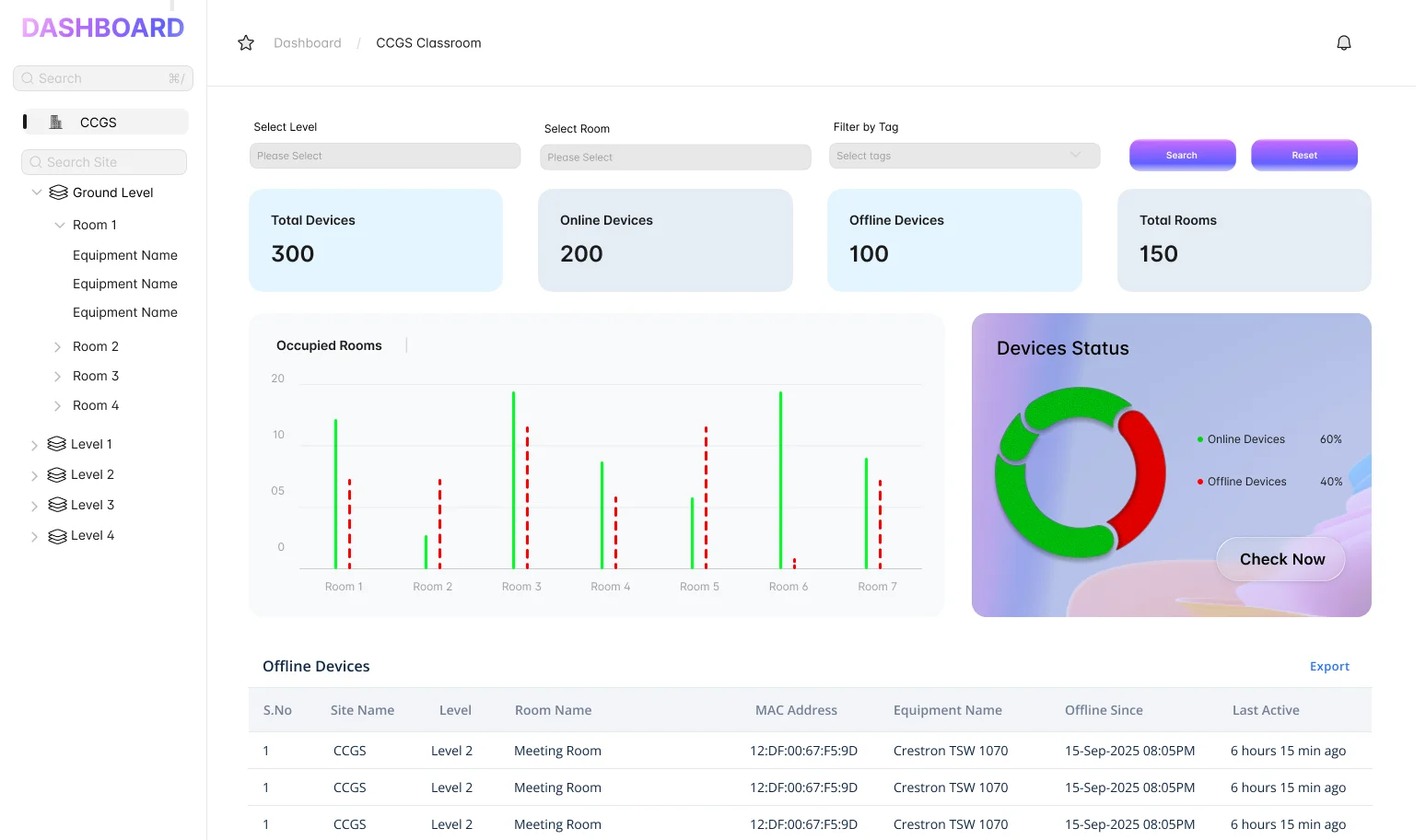
Global Health Visualized.

Our  Honeycomb Fault Grid  provides an instant, birds-eye view of your global Zoom footprint.

1. Peripheral
Transparency

Instantly see if a USB-C cable is unplugged or if a Zoom Room Controller has lost its pairing.

2. Environmental
Data

Monitor room occupancy and CO2 levels (on supported hardware) alongside system health.

3. AI-Driven
Support

Get instant remediation steps powered by our AI engine, tailored to specific Zoom Room error codes.

Beyond the Zoom Dashboard.

While Zoom provides excellent native tools, AVM-360 adds the deep-layer hardware forensics that IT teams need for enterprise-grade uptime:

Advanced ZDM Integration

Leverage Zoom Device Management data combined with our proprietary hardware polling.

Cross-Platform Analytics

Compare performance trends across different hardware vendors to make data-driven procurement decisions.

Log Aggregation

Pull system and application logs remotely to troubleshoot "ghost in the machine" issues without visiting the room.


Customers Testimonial

Global Head of Collaboration Fintech Leader

"AVM-360 gives us the 'missing link' in our Zoom Room strategy. We finally have a unified view of our ProAV rooms and our plug-and-play appliances in one place."

IT Operations Manager Enterprise Workplace

“AVM360 gives us real-time visibility into Zoom Rooms, helping us catch issues early and avoid last-minute meeting failures.”

Director of Managed Services AV Integrator

“Managing Zoom Rooms across multiple sites is far simpler with AVM360 — one dashboard, fewer surprises, and less reactive support.”

AV Systems Lead Multi-Site Environment

“AVM360 helps us keep Zoom Rooms ready before classes and meetings begin, reducing downtime and support calls across campus.”

Take the Complexity Out of Zoom Room Management.

Eliminate downtime and maximize your Zoom investment with AVM-360.

Join 500+ Enterprises optimizing their workspace.

Device-agnostic AV monitoring system – AVM-360