

Every Tool Your AV Team Needs
to Go From Reactive to Proactive
AVM-360 gives IT managers and AV teams complete visibility, intelligent alerts, remote control, asset intelligence, and AI-powered diagnostics — all from a single platform.
See Every Room, Every Site, All at Once
Stop logging into ten different systems. AVM-360 brings every site, building, level, and room into one live dashboard — with instant drill-down to the exact device causing the issue.
- Site → Building → Level → Room hierarchy for precise fault localisation
- Honeycomb Fault Grid shows every offline room at a glance — ideal for support desk triage
- Real-time device counts: online, offline, and priority-ranked alerts
- Filter by site, level, room, or tag to quickly isolate problem areas
- Works with Crestron, Extron, Cisco, Poly, Philips, Samsung, Biamp, Kramer and more


Know About the Problem
Before the Meeting Starts
AVM-360 detects issues the moment they happen and surfaces them with full context — site, level, room, device, and priority — so your team is fixing the problem before anyone else notices.
- High / Medium / Low priority classification so your team tackles what matters first
- Offline device table: site, level, room, MAC, equipment, time offline, last active
- Dynamic Priority Rules — escalate critical rooms during peak hours automatically
- Instant notifications via email, SMS, or your existing ticketing platform
- Export offline device reports for SLA auditing and leadership reporting
Diagnose It Before You
Even Leave the Desk
Most AV issues can be diagnosed without dispatching a technician. Drill down into any device, see its live status, query real-time telemetry (lamp hours, power state, input status), and trigger remote actions — so you arrive prepared, not guessing.
- Per-device detail view: IP, MAC, live status, and full log history
- Query device telemetry in real time — lamp hours, power status, input state, errors
- Trigger remote commands directly from the device detail panel
- Attach room schematics and wiring docs so technicians arrive prepared
- AI Summary tab gives instant plain-English analysis of any device's condition


Know the Value, Health & Future of Every Device You Own
Most IT teams don't know which devices are out of warranty, how much their AV estate is worth, or which devices are close to end-of-life. AVM-360's Asset Tracking gives you complete financial and lifecycle visibility — per device, per room, per site.
| Device | Expiry | Status |
|---|---|---|
Crestron MPC3-302-B | 2026-02-04 | Expired |
Crestron MPC3-302-B | 2026-03-26 | Expired |
Philips 75BDL3550Q | 2026-05-06 | 39 days |
| Device Name | Model | MAC Address | Purchase Date | Warranty Expiry | Purchase Value | Life |
|---|---|---|---|---|---|---|
Crestron MPC3-302-B | MPC3-302-B | C4:42:68:59:D7:BA | 2025-04-15 | 2026-03-26 Exp. | $100.00 | 1 Yr |
Crestron TS-1070-B-S | TS-1070-B-S | C4:42:68:76:DF:96 | 2026-03-18 | 2026-08-13 | $111.00 | 16 Yr |
Philips 75BDL3550Q | 75BDL3550Q | C4:42:68:AA:11:22 | 2024-11-01 | 2026-05-06 | $2,800.00 | 7 Yr |
Give Leadership Numbers That
Prove Your Team's Value
It's not enough to prevent problems — you need to show leadership the value of doing so. AVM-360 generates the reports that translate AV uptime into business impact: ROI, utilisation rates, and incident summaries.
- Room utilisation rates — know which rooms are overused, underused, or redundant
- Uptime reports per site, building, and room — SLA-ready and CSV exportable
- Incident history with resolution times — prove response efficiency to management
- Device lifecycle reports — support procurement with evidence, not guesswork
- AI-powered executive summaries — key findings generated automatically each month
Your Helpdesk Can Resolve
AV Issues Without AV Expertise
Every device in AVM-360 has an AI Summary tab that analyses its current state, fault history, and telemetry — and delivers a plain-English diagnosis instantly. Your level-1 team resolves most issues without escalating a single ticket.
- AI Summary tab on every device — no specialist AV knowledge required to use it
- Reads live telemetry: lamp hours, power state, input errors, signal quality
- Step-by-step resolution guidance generated from real device data
- AI executive summaries turn monthly utilisation data into board-ready insights
- Learns from your specific device estate — gets smarter with every resolved incident
Plugs Into the Tools Your Team Already Uses
AVM-360 connects with your existing IT stack — ticketing, collaboration, ITSM, and CMDB platforms. AV data flows straight into the systems your team lives in.
Need a custom integration? Talk to our team →
Every Feature. One Platform. Live in 48 Hours.
Start your free trial and get full access to every feature — with fully managed onboarding from our team.
Centralised Monitoring
Stop logging into ten different systems. AVM-360 brings every site, building, level, and room into one live dashboard — with instant drill-down to the exact device causing the issue. See every room's status at a glance in the Honeycomb Fault Grid.
What you get:
- Site → Building → Level → Room hierarchy for precise fault localisation across any number of locations
- Honeycomb Fault Grid: every room's status in one visual — green is healthy, red needs attention
- Real-time KPI cards: Total Rooms, Devices Online, Offline Count, and Priority breakdown
- Filter by site, level, room, or tag to quickly isolate problem areas
- Works with Crestron, Extron, Cisco, Poly, Philips, Biamp, Kramer and all major AV brands
Instant Fault Alerts
AVM-360 detects issues the moment they happen and surfaces them with full context — site, level, room, device, and priority level — so your team is fixing the problem before a single user complains.
What you get:
- High / Medium / Low priority classification so the right incidents get attention first
- Offline device table shows site, level, room, MAC address, equipment name, offline since, and last active time
- Dynamic Priority Rules — automatically escalate critical rooms (e.g. boardroom) during peak hours
- Notifications via email, SMS, or direct integration with ServiceNow, Zendesk, Jira, and ManageEngine
- Export offline device reports for SLA auditing and leadership reporting at any time
Remote Diagnostics & Control
Most AV issues can be diagnosed without dispatching anyone. Drill into any device, see its live telemetry (lamp hours, power state, input status, errors), and trigger remote commands where supported — so your team arrives prepared with the right tools.
What you get:
- Per-device detail view: live status, IP address, MAC address, and full activity log history
- Query real-time telemetry — lamp hours, power status, input state, error codes — for projectors, displays, and more
- Trigger remote commands directly from the device panel without needing specialist AV tools
- Attach room schematics and wiring diagrams at room or device level so technicians arrive prepared
- AI Summary tab provides instant plain-English analysis of any device's current condition
Utilisation & ROI Reporting
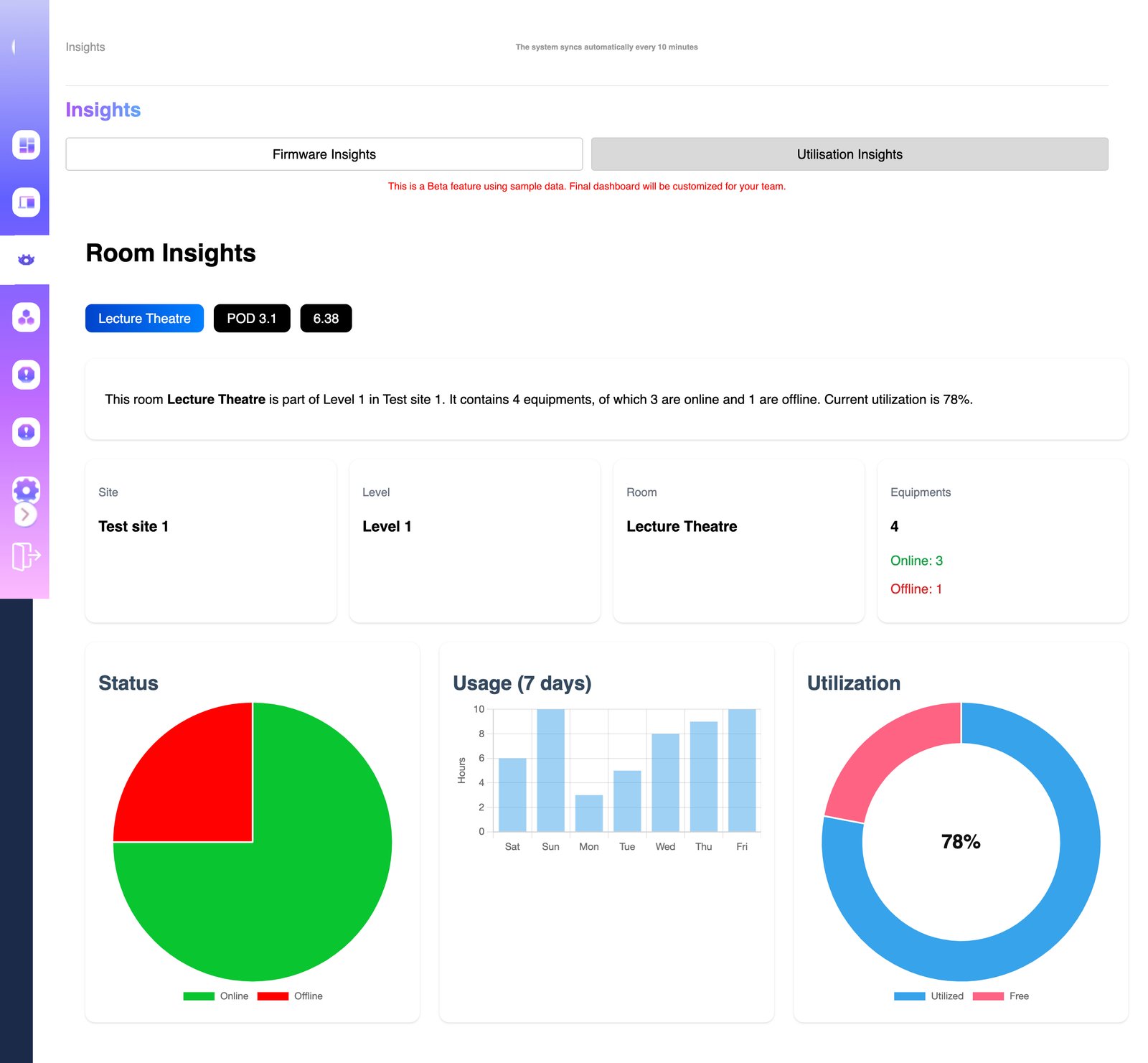
It's not enough to prevent problems — you need to show leadership the value of doing so. AVM-360 generates reports that translate AV uptime into business impact: cost savings, utilisation rates, and incident summaries your CFO will understand.
What you get:
- Room utilisation rates — know which rooms are overused, underused, or could be decommissioned
- Uptime reports per site, building, and room — SLA-ready and exportable to CSV at any time
- Incident history with resolution times — prove your team's response efficiency to management
- Device lifecycle reports — support procurement and refresh cycles with real evidence
- AI-powered executive summaries — key findings and recommendations generated automatically each month
AI-Powered Diagnostics
Every device in AVM-360 has an AI Summary tab that analyses its current state, fault history, and live telemetry — then delivers a plain-English diagnosis with step-by-step resolution guidance. Your level-1 helpdesk resolves most AV issues without ever escalating a ticket.
What you get:
- AI Summary tab on every single device — no AV specialist knowledge required to interpret it
- Reads live telemetry: lamp hours, power state, input status, error codes — in real time
- Delivers step-by-step resolution guidance generated from actual device data, not generic advice
- AI executive summaries transform monthly utilisation and incident data into board-ready insights
- Learns from your specific device estate — resolution quality improves over time